
UPDATE: July 23, 2023.
- I have created Custom Plugin to enable/disable Maintenance Mode.
- Follow the new how-to guide under.
ERROR: July 22, 2023.
- Currently this approach is not compatible with the new version of Oxygen Builder and Rank Math SEO.
- I will try to update the new solution as soon as possible.
What is maintenance mode?
Maintenace mode is the system maintenance mode that you can see when a website is being updated or modified.
By default, in Wordpress maintenance mode is only activated when the website is updating plugins, themes, core, etc. To turn it on/off at will, you need to install a plugin or theme that has been created in maintenance mode.
For those of you using Elementor, they have integrated a maintenance option in settings. All that remains is to create the template to your liking.
In this article, I will guide you to create Maintenance mode yourself without installing a plugin. I created on Oxygen Builder drag and drop, as long as you understand how it works, it will be applicable in all other cases.
Instructions for creating Maintenance mode in Oxygen Builder
I edited in the template Catch All that were created earlier.
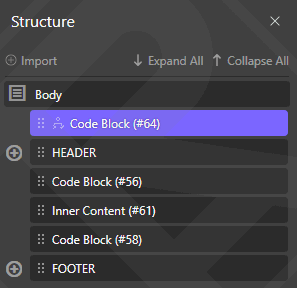
Create Code Block and put in the top position with the code as below. I have annotated the functions of each code in.
<!-- Thông báo cho bot thu thập dữ liệu như Google hay Bing biết được website đang bảo trì và quay lại sau khoảng thời gian được chỉ định. -->
<?php
	header("HTTP/1.1 503 Service Temporarily Unavailable");
	header("Status: 503 Service Temporarily Unavailable");
	header("Retry-After: 3600"); //Sau "3600 giây = 1 giờ" bot thu thập dữ liệu sẽ quay lại.
?>

<!-- _____________________________________ -->
<!-- Mã HTML giao diện chế độ Maintenance. -->
<div>
	<h1>BẢO TRÌ</h1>
</div>
<style>
	body{
		background-color: #fff;
	}
	h1{
		color: #000;
	}
</style>

<!-- _____________________________________________________ -->
<!-- Đoạn mã dùng để dừng thực thi các đoạn code phía sau. -->
<?php
	exit();
?>
Create your own design or find it on codepen, and I'm just as simple as this.
Turn on/off Maintenance mode
Adjust Condition to hide/show elements for Admin and user.
- Maintenance ON: Only visible to users, not in Admin.
- Maintenance OFF: not visible for both.
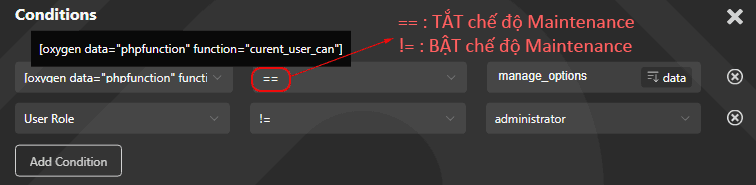
Because Oxygen has no command != give User Can so it needs to be done differently.
Add Condition → Dynamic Data → PHP Function Return value → Function Name: enter current_user_can → manage_options.
Option 2: Create Custom Plugin
Create Custom Plugin with function to enable Maintenance Mode. And that only applies to the user interface.
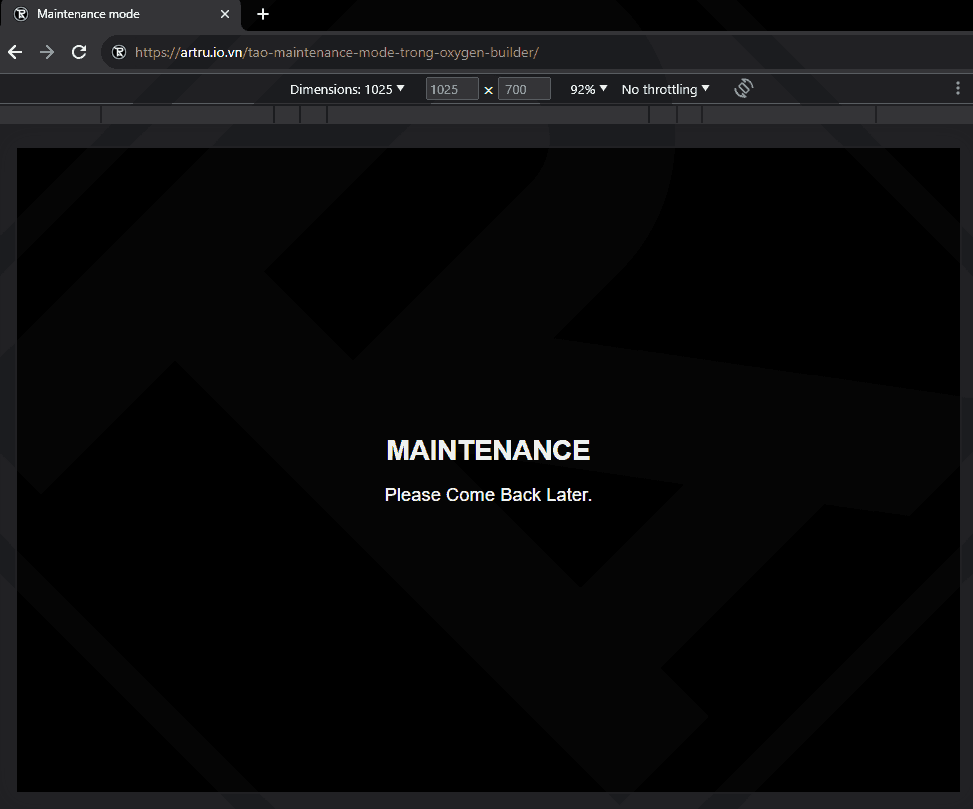
1. Create your own custom plugin directory. For example 1-MAINTENANCE
2. In this folder you create 2 files index.php and 1-MAINTENANCE.php.

In the file index.php Enter this code:
<?php
// Silence is golden.
File 1-MAINTENANCE.php Paste the below code in:
<?php
/*
Plugin Name: 1-MAINTENANCE
Description: Plugin Maintenance mode.
Version: 1.0
Author: ARTRU
*/

define('MAINTENANCE_MODE_503_FILE', __FILE__);
register_activation_hook(MAINTENANCE_MODE_503_FILE, 'maintenance_mode_503_enable');
register_deactivation_hook(MAINTENANCE_MODE_503_FILE, 'maintenance_mode_503_disable');
function maintenance_mode_503_enable()
{
    set_transient('maintenance_mode_503', true, 0);
}
function maintenance_mode_503_disable()
{
    delete_transient('maintenance_mode_503');
}
function maintenance_mode_503_check()
{
    if (get_transient('maintenance_mode_503') && !current_user_can('manage_options')) {
        header('HTTP/1.1 503 Service Unavailable');
        header('Retry-After: 3600');
        header('Cache-Control: no-cache, must-revalidate, max-age=0');
        header('Pragma: no-cache');
        echo '
            <title>Maintenance mode</title>
            <div id="artru-maintenance_div">
                <h1 id="artru-maintenance_h1">MAINTENANCE</h1>
                <p id="artru-maintenance_p">Please Come Back Later.</p>
            </div>
            <style>
                body{
                    margin: 0px;
                    padding: 0px;
                    display: flex;
                    height: 100vh;
                    width: 100%;
                    background-color: #000;
                    color: #fff;
                    font-family: sans-serif;
                }
                #artru-maintenance_div{
                    margin: auto;
                    text-align: center;
                }
                #artru-maintenance_h1{
                    font-size: 30px;
                }
                #artru-maintenance_p{
                    font-size: 20px;
                }
            </style>
        ';
        exit();
    }
}
add_action('init', 'maintenance_mode_503_check');
?>
3. That's it. You can enable/disable Maintenance mode by Activate or Deactivate this plugin.

Good luck.

Comment