
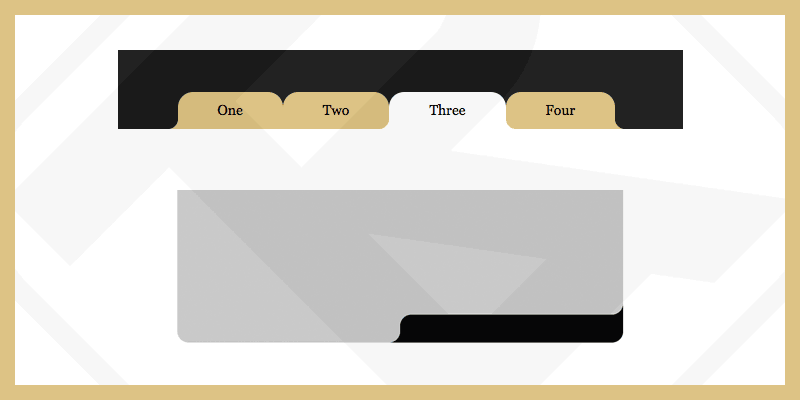
现在可以通过属性轻松实现圆角 border-radius。相反,如果你想把“外”角变成圆角,则需要自定义更多步骤才能获得所需的结果。
您可以搜索关键字“Round Out Borders”了解更多方法。
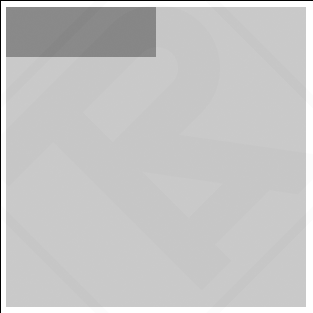
例如:边角不圆角时的自然状态。
<div class="div-outer">
  <div class="div-inner">
    <div class="div-inner-2">
      <!-- Contents -->
    </div>
  </div>
</div>
<style>
  .div-outer{
    width: 300px;
    height: 300px;
    background-color: #c3c3c3;
  }
  .div-inner{
    width: 50%;
    height: 50px;
    background-color: gray;
  }
</style>
在这种情况下我通常使用伪元素 ::before, ::after 创建圆角“外”角。但你需要 4 个伪元素才能做到这一点。由于CSS中的伪元素不能多次创建,所以我被迫再创建1个 div-inner-2.
根据问题,我们需要在2个位置创建“外”角 Top-Right 和 Bottom-Left
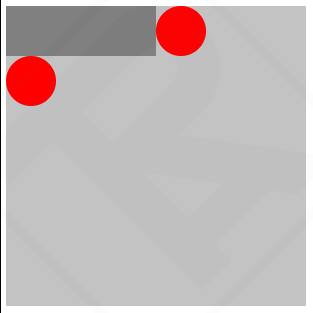
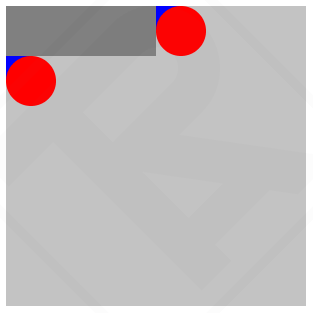
在角处画一个圆,并用 ::before 伪元素覆盖
<div class="div-outer">
  <div class="div-inner">
    <div class="div-inner-2">
      <!-- Contents -->
    </div>
  </div>
</div>
<style>
  .div-outer{
    width: 300px;
    height: 300px;
    background-color: #c3c3c3;
  }
  .div-inner{
    width: 50%;
    height: 50px;
    background-color: gray;
    position: relative;
  }
  .div-inner::before{
    content: "";
    width: 50px;
    height: 50px;
    position: absolute;
    background-color: red;
    right: -50px;
    top: 0;
    border-radius: 50%;
  }
  .div-inner-2::before{
    content: "";
    width: 50px;
    height: 50px;
    position: absolute;
    background-color: red;
    left: 0;
    bottom: -50px;
    border-radius: 50%;
  }
</style>
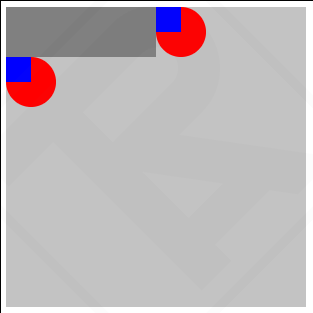
使用 ::after 伪字在需要圆化的角处绘制一个额外的正方形
<div class="div-outer">
  <div class="div-inner">
    <div class="div-inner-2">
      <!-- Contents -->
    </div>
  </div>
</div>
<style>
  .div-outer{
    width: 300px;
    height: 300px;
    background-color: #c3c3c3;
  }
  .div-inner{
    width: 50%;
    height: 50px;
    background-color: gray;
    position: relative;
  }
  .div-inner::before{
    content: "";
    width: 50px;
    height: 50px;
    position: absolute;
    background-color: red;
    right: -50px;
    top: 0;
    border-radius: 50%;
  }
  .div-inner::after{
    content: "";
    width: 25px;
    height: 25px;
    position: absolute;
    background-color: blue;
    right: -25px;
    top: 0;
  }
  .div-inner-2::before{
    content: "";
    width: 50px;
    height: 50px;
    position: absolute;
    background-color: red;
    left: 0;
    bottom: -50px;
    border-radius: 50%;
  }
  .div-inner-2::after{
    content: "";
    width: 25px;
    height: 25px;
    position: absolute;
    background-color: blue;
    left: 0;
    bottom: -25px;
  }
</style>
设置圆的 z-index: 10,然后相应地更改背景颜色,您将获得结果。
<div class="div-outer">
  <div class="div-inner">
    <div class="div-inner-2">
      <!-- Contents -->
    </div>
  </div>
</div>
<style>
  .div-outer{
    width: 300px;
    height: 300px;
    background-color: #c3c3c3;
  }
  .div-inner{
    width: 50%;
    height: 50px;
    background-color: gray;
    position: relative;
    border-radius: 0px 0px 25px 0px;
  }
  .div-inner::before{
    content: "";
    width: 50px;
    height: 50px;
    position: absolute;
    background-color: #c3c3c3;
    right: -50px;
    top: 0;
    border-radius: 50%;
    z-index: 10;
  }
  .div-inner::after{
    content: "";
    width: 25px;
    height: 25px;
    position: absolute;
    background-color: gray;
    right: -25px;
    top: 0;
  }
  .div-inner-2::before{
    content: "";
    width: 50px;
    height: 50px;
    position: absolute;
    background-color: #c3c3c3;
    left: 0;
    bottom: -50px;
    border-radius: 50%;
    z-index: 10;
  }
  .div-inner-2::after{
    content: "";
    width: 25px;
    height: 25px;
    position: absolute;
    background-color: gray;
    left: 0;
    bottom: -25px;
  }
</style>
其他例子
见笔 圆润边框 通过阿特鲁 (@artrublog) 在 代码笔.


评论